

Hello, I’m Ishii from the Stroly development team.
At the end of January, I had the chance to go back to my hometown in Hyogo Prefecture, and I got
to see my niece for the first time in about a year. I really felt how much she had grown. She no
longer burst into tears the moment she saw my face, and she no longer clung to someone and hid
behind them when walking past me.
While it’s certainly a happy thing, I had actually been enjoying the whole situation of her
crying the instant she saw me, so I do feel a bit of sadness. But I think we’ve now entered the
phase where we can start becoming friends.
I’m hoping I can manage to visit home a little more often from now on.
With that, let me introduce today’s release details.
Viewer Release Information
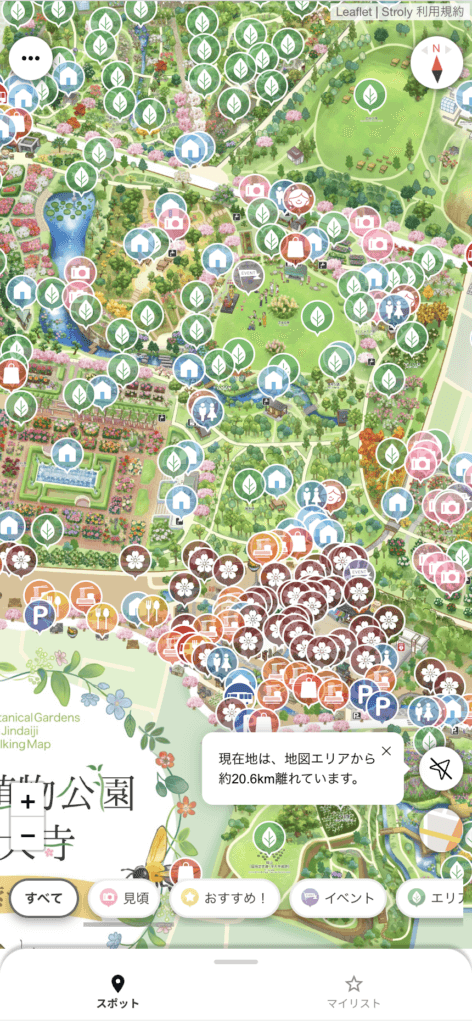
Distance from your current location to the map area is now displayed in a speech bubble
Stroly maps have a defined coverage area. When you activate GPS and you’re actually within the
map’s coverage area, your current location is displayed on the map, allowing you to check your
position while viewing the map.
We want users to actually travel to the area covered by the map and use it on-site. With this
update, when you are outside the map’s coverage area, the distance to the map area is now
displayed as a speech bubble.
To display the distance, simply tap the “GPS” button. Each time you tap the “GPS” button, the
distance from your current location to the map’s coverage area is calculated and shown as a
speech bubble near the “GPS” button. This serves as a handy guide for how far you are from
reaching the map’s coverage area, so please give it a try.
Updates to the Privacy Policy and Terms of Service
As of today, we have revised Stroly’s “Privacy Policy” and “Terms of Service.” When using Stroly,
please take a moment to review the updated content.
Terms of Service
Privacy Policy
We have many more updates planned for Stroly in the future.
Stay tuned for what’s coming next!